Leadveyor for GoHighLevel
Every GoHighLevel lead scored, right on the contact.
Install Leadveyor from the App Marketplace on one sub-account or all of them. New SMS, chat, email, Facebook, Instagram and WhatsApp conversations and form leads are scored by your rules, and your workflows act on the result.
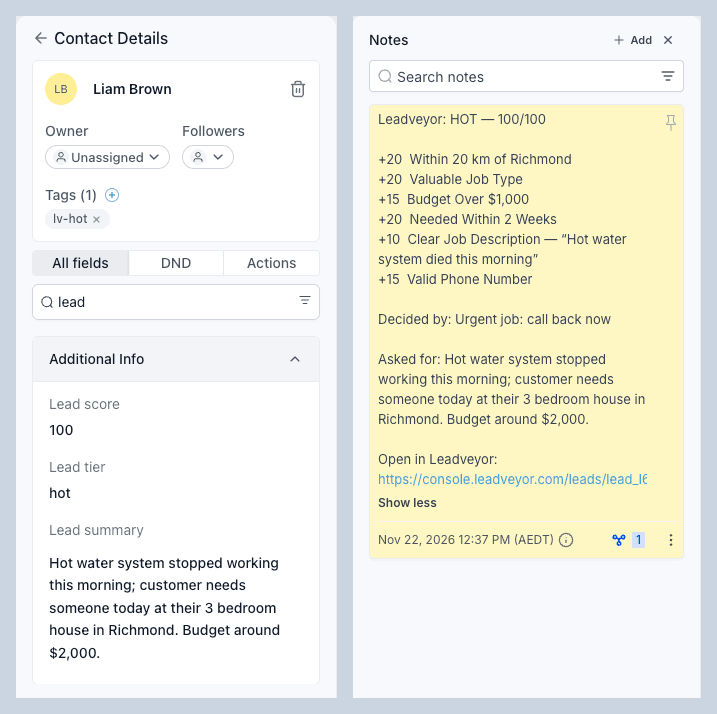
Tags your workflows trigger on
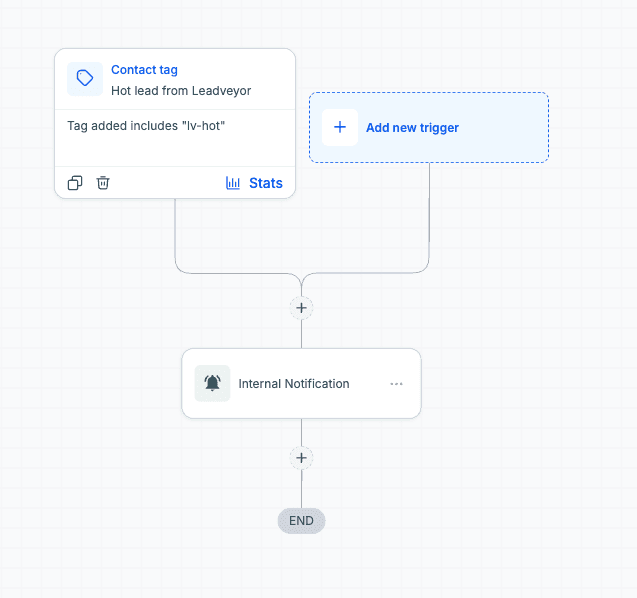
lv-hot, lv-warm or lv-cold on the contact, lv-junk for spam and sales pitches. Contact Tag added lv-hot → notify the team.
The reason, not just a number
A note on the contact lists every criterion that was met, quoting the customer, and what is missing.
Lead score fields
Lead score, Lead tier and Lead summary custom fields, ready for smart lists, filters and reporting.
Built for agencies
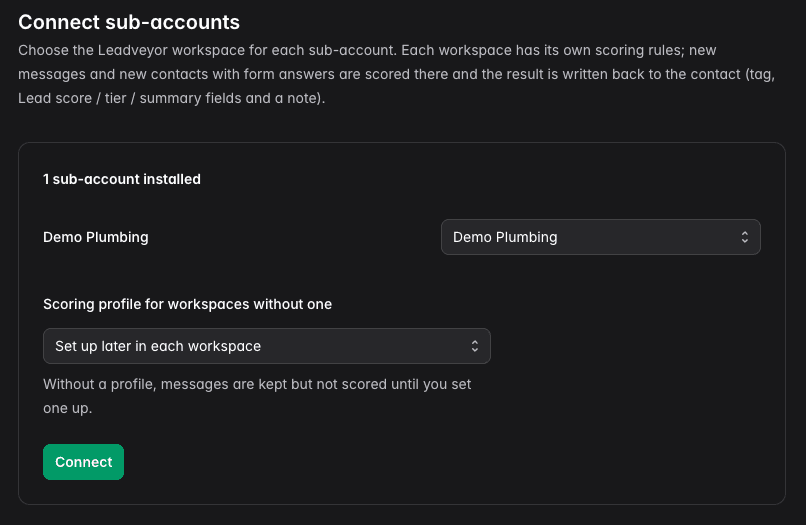
Install once on every sub-account; each client is scored in its own workspace with its own rules. Copy a proven profile to new clients in a click.
Won deals come back
When an opportunity is marked Won, Lost or Abandoned, Leadveyor records the outcome, so reports show which leads really turn into customers.
Conversations, not single messages
Messages of one conversation are read together once it goes quiet, so "Hi" followed by the details is scored once, on the whole thing.
See it
What it looks like in GoHighLevel
Set up
Running in a few minutes
- 1
Install from the App Marketplace
Choose one sub-account or, as an agency, all of them (with auto-install for new ones).
- 2
Pick a workspace for each sub-account
Sign in to Leadveyor and link each sub-account to a workspace, new or existing.
- 3
Describe what a good lead is
Write a few sentences about the business; Leadveyor writes the scoring criteria. Adjust and publish.
- 4
Use the tags
Build workflows on lv-hot / lv-warm / lv-cold: alerts, opportunities, nurture campaigns.
Every step with screenshots: GoHighLevel setup guide
FAQ
Questions
- Does it work in white-label versions of GoHighLevel?
- Yes. In LeadConnector and agency-branded CRMs built on GoHighLevel, Leadveyor appears in the agency’s own App Marketplace under the same name.
- Does Leadveyor send messages to my contacts?
- No. It reads incoming messages and contacts, and writes tags, three Lead fields and notes. It never sends messages and never changes opportunities.
- How are sub-accounts billed?
- Each connected sub-account is a workspace on your plan. The Agency plan includes 25.
- What if a sub-account has no scoring rules yet?
- Messages are kept and scored as soon as you publish a profile for that workspace.
Also works with
Other integrations
Stop sorting. Start calling the right people first.
Free while in beta. We’re letting businesses in a few at a time and we’ll help you set up your first rules.